 komrad
Komrad's engine
The AWS engines komrad's own team works on, from the control plane and each person's engine to the database, sign-in, the network and credentials.
Komrad’s own team works on remote engines in AWS, one for each person, with a control plane in front of them. The repository holds the infrastructure code, and this guide walks through it.
AWS resources#
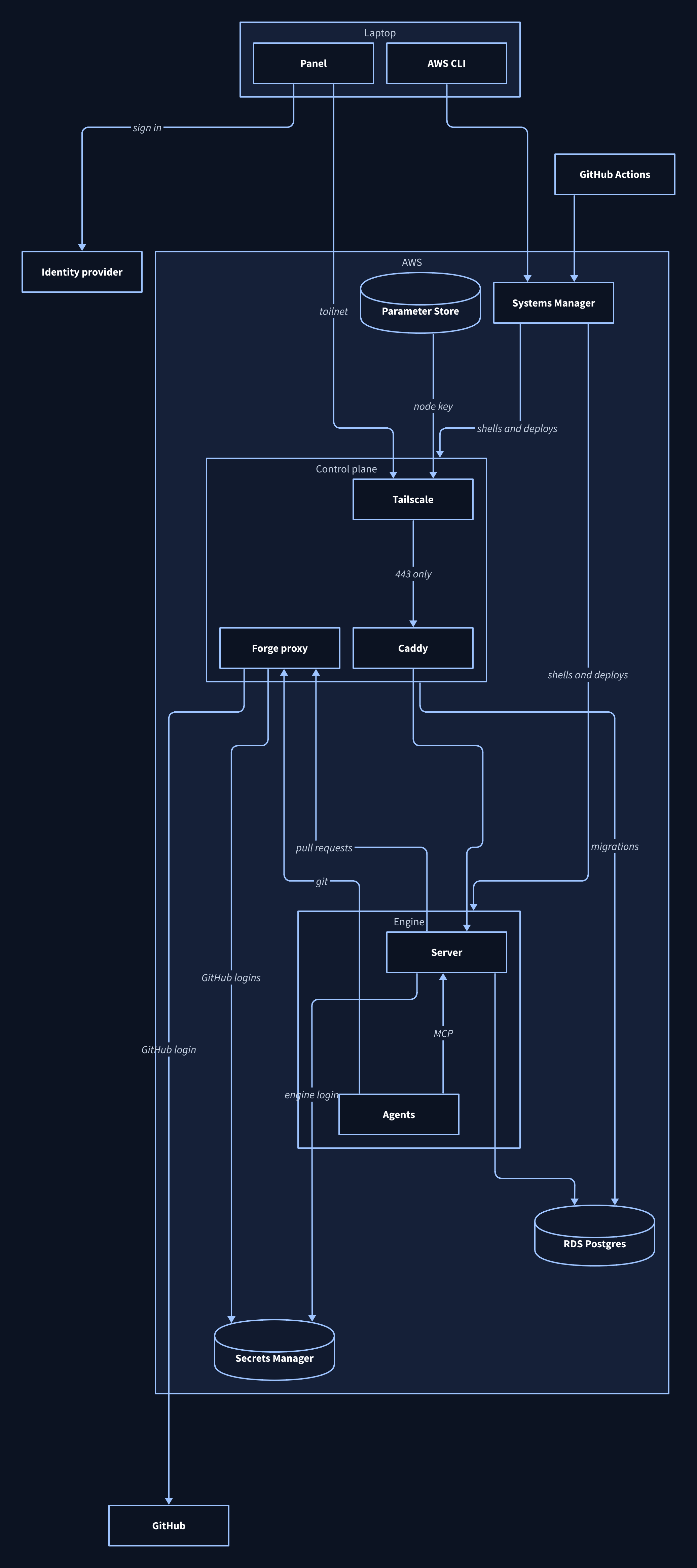
One EC2 instance runs the control plane: Tailscale, Caddy and the forge proxy. Each engine runs on an EC2 instance of its own, which runs a komrad server and keeps its worktrees, logins and config on a separate EBS volume. When Terraform replaces an engine’s instance, it moves the volume to the new one.
The control plane has an Elastic IP. Every request to GitHub leaves from it, so an organisation that allowlists addresses needs only that one, and Tailscale connects laptops to it directly.
Postgres runs on RDS, in private subnets that only the engines and the control plane can reach. RDS manages the owner login’s password, keeps it in Secrets Manager and keeps a week of automatic backups.
Secrets Manager also holds the key the control plane uses to join the tailnet, the forge proxy’s certificate key, each engine login’s password and each person’s GitHub login. Only the control plane reads the owner login’s password, the forge proxy’s certificate key and the GitHub logins.
Parameter Store holds the control plane’s Tailscale identity, so a replaced control plane joins the tailnet as the same device.
The control plane#
The control plane doesn’t hold agents or an engine. It keeps only Caddy’s state on a data volume, so Terraform can replace it at any time. Engines keep running while it is replaced.
Its user data writes the tailnet name into Caddy’s config, starts Caddy and joins the tailnet. Caddy sends each engine’s path, such as /harry, to that person’s engine.
The control plane owns the database. At boot and on every deploy it runs the migrations, makes each person’s engine and grants it to that person, as database credentials shows. Its IAM role also reads people’s GitHub logins and starts and stops engines.
Engine instances#
Each person’s engine runs on an instance of its own. Everything that has to outlive the instance sits on its data volume or in the database, so Terraform can replace it at any time. Any agents running at the time stop, and the person resumes them once the new instance is up.
An operator adds each person’s engine to terraform.tfvars, with the person’s email and the instance’s size. Terraform makes the instance and its volume, and the control plane makes the engine and grants it to that email alone. The person starts and stops their engine from the panel, through the control plane.
The image#
Packer builds two images from the template in packer. The control plane image carries Tailscale, Caddy and komrad. The engine image carries komrad and the tools the agents use, including git, tmux, Docker, mise and the agent CLIs. Projects bring their own languages, such as Go and Node, through mise. Each layer is a short shell script, so adding a tool means adding a script.
Each image carries a komrad binary so the server can start on first boot, before any deploy has run. Each deploy replaces that binary, which means an image only needs rebuilding when a tool or a boot step changes.
The komrad account#
The server, every agent and the person’s own shells run as an account named komrad, which can’t become root. Agents run whatever commands they decide to run, and the account keeps those commands away from the system and from the instance’s AWS credentials. Those credentials come from the instance metadata service, and a firewall rule lets only root reach it. Docker runs rootless under the komrad account, so agents can still build and run containers.
Deploys and restarts need root, and they reach the instance through AWS Systems Manager. Operator and CI access covers that path.
The data volume#
The data volume holds the komrad account’s home directory, which has komrad’s config, the person’s dotfiles and the agent CLIs’ logins. Every agent’s worktree is on it too, along with komrad’s cache and log and the tools mise installs. When Terraform replaces the instance, the volume moves to the new one.
Boot#
Terraform hands each engine’s instance a short user data script. The script records which volume and database belong to the engine, and writes the identity provider into the server’s config. Any process on the instance can read user data, so the script carries nothing that has to stay secret. The provider’s client secret is in it, but the engine hands that to every laptop that signs in anyway.
Systemd starts everything else in order. The data volume mounts first, and every unit that uses it waits for the mount. If the volume is missing, the server never starts, which keeps it from writing to the root disk by mistake.
Once the volume is up, the credentials unit reads the engine login’s password from Secrets Manager and writes the server’s connection string. The server starts after it finishes, and komrad then creates the tmux session the agents run in.
Server restarts#
The komrad server starts the tmux server that holds the agents, so tmux runs inside the server’s systemd service. Left to its defaults, systemd would kill tmux whenever the server stopped. The server’s unit tells systemd to stop only the server process, so a restart or a deploy leaves tmux and the agents running, and the new server picks them up.
Stopping or replacing the instance does stop every agent. Their conversations and worktrees stay on the volume, and the person resumes them once the engine is back.
The database#
Postgres holds every record an engine keeps, including the list of people who may use it. Komrad connects with three different logins, and each one can do only what its job needs.
Database logins#
The owner login owns the schema. komrad migrate, komrad engine ensure and the grant commands connect as the owner, and only the control plane runs them.
The server runs as the engine login, which komrad engine ensure creates for each engine. Postgres row-level security limits that login to its own engine’s rows, so every person’s engine shares one database without seeing each other’s data.
The reader login sees the same rows as the engine login and can’t write any of them. When an agent queries the database through komrad’s MCP tools, the query runs as the reader.
Database credentials#
RDS creates the owner login and stores its password in Secrets Manager, where only the control plane can read it. The control plane never writes the password to disk.
The control plane’s credentials unit runs at boot, during every deploy and once an hour. Each run migrates the database, and makes sure each person in terraform.tfvars has an engine, an engine login and a grant for their email. It stores each engine login’s password in a secret only that engine’s instance can read. A deploy updates the control plane first, so new migrations land before any engine’s new server starts. The hourly run picks up the owner login’s new password after RDS rotates it.
Each engine’s credentials unit waits at boot until the control plane has written the engine’s secret. It then reads the secret and writes the server’s connection string to a file only root can read, and the server starts only once that file exists.
Backups#
RDS keeps automatic backups for seven days. Deletion protection is on, and Terraform refuses to destroy the database until you turn it off, as tearing it down shows.
Access#
A remote engine lets in only people it can identify and whom an operator has granted access. People prove who they are by signing in with an identity provider, and the engine looks up a grant for each of them. The control plane sits on a Tailscale network, so a laptop has to be on that network to reach any engine. Operators reach the control plane and every engine through AWS Systems Manager, so none needs an open port for shells.
Signing in#
Each person signs in once per engine, from their laptop:
komrad login --engine devKomrad asks the engine’s /sign-in page which identity provider it trusts and opens a browser at that provider. The person signs in there, along with any MFA the provider requires. The provider then sends the browser back to komrad on 127.0.0.1:8085 with a one-time code, and komrad trades the code for an ID token and a refresh token. Komrad checks that the answer belongs to the sign-in it started. Only the provider ever sees the person’s password.
The panel can sign a person in too. On an engine at a URL, the panel asks the engine whether the person has access before it shows anything. Without a sign-in it shows only a sign-in screen, and enter opens the provider’s page in the browser. If nobody granted the person access, the panel says to ask an operator. If the engine or the provider doesn’t answer, the panel says so, and enter tries again.
Komrad keeps both tokens in the system keychain. A machine without a keychain keeps them in a private file under komrad’s state directory. komrad logout removes them from both places. If a panel for that engine is open on the same machine, logout closes any agent terminal it was showing and restarts it at the sign-in screen. A terminal you started yourself keeps its stream until the token it holds runs out, at most an hour later. A terminal opened while the machine has no sign-in says so and attaches once you run komrad login.
Tokens#
The panel and every command send the ID token with every request. The token lasts about an hour at most providers. When it has less than five minutes left, komrad uses the refresh token to get a new one without opening the browser. If the provider refuses, komrad asks the person to sign in again. If the provider doesn’t answer, komrad says so, and the same sign-in works once the provider is back. komrad token prints a current ID token, so a script can call the engine’s API with it.
A terminal or the panel’s stream of events can stay open for hours. While a request is open, the engine checks the grant again every minute, and it ends the request when the token expires. An open terminal sends a fresh token down the stream before the old one expires, so the terminal stays open. It also sends a message every 20 seconds, so a proxy in front of the engine never sees a quiet terminal as a dead one. The panel reopens its stream with a fresh token. When the stream ends because the grant was revoked, the sign-in can’t be renewed, or the provider doesn’t answer, the panel clears everything it showed and goes back to its sign-in screen. If only the engine stopped answering, the panel keeps what it showed and reconnects.
Request checks#
The control plane passes each request to the engine’s public listener unchanged, and the listener checks it. The token has to carry a valid signature from the provider the engine trusts, it has to have been issued for komrad, and it can’t have expired. A request that fails any of those checks gets a 401.
Next the listener looks for that person’s grant on this engine, and answers 403 if there isn’t one. Once a request passes, the person’s identity goes with it into the handler and into the log.
A stopped engine has no listener, so the control plane answers for it. It serves the engine’s /sign-in page, so a person can sign in, and tells the panel the engine is stopped. When the person asks to start the engine, the control plane checks their token the same way and looks up their grant on that engine before it starts the instance. Stopping goes through the same checks.
Access grants#
komrad engine grant gives a person access by email address, and komrad engine revoke takes it
away. An email address can move to a different account, so the first time a granted person signs in with a verified
email, the engine records the permanent id their provider uses for that account and matches on that id afterwards.
A grant gives full access. A granted person can do everything the panel does, including open a shell as the account the agents run as. Each engine has one grant, for the person it belongs to. The control plane sets that grant from terraform.tfvars and removes it with the engine.
The engine caches each grant for a minute, so a revoke takes effect within a minute, open terminal sessions included. If the engine can’t reach the database to check a grant, it refuses the request.
Provider registration#
An operator registers komrad with their identity provider once, as a desktop app with http://127.0.0.1:8085 as its redirect address. The provider issues a client id. On komrad’s engine, sign_in_issuer and sign_in_client_id in terraform.tfvars name the provider and that id, and Terraform writes them into the control plane’s config and each engine’s config. Changing either one replaces the control plane and every engine’s instance, the same as a new image does. An engine you run yourself takes them in the [sign_in] table of its config.
Google also issues a client secret. The secret can’t stay secret, since the engine hands it to every laptop that signs in, but Google requires one, so it goes in sign_in_client_secret as well. Publish the app on Google, or make it internal to your Workspace. If you leave it in testing mode, Google makes everyone sign in again every week.
Server listeners#
The public listener takes people’s requests on the instance’s private address, and the instance’s security group lets only the control plane reach it. It runs the checks above on each request. It serves the API, plus one public page that tells a panel which identity provider to use. Komrad’s MCP endpoint isn’t on it, and it ignores the headers that identify an agent, so a person can’t pose as one.
The loopback listener serves the agents’ MCP tools and the CLI in a shell on the instance. It skips the identity checks, because only processes on the instance can reach it.
Operator and CI access#
Operators reach the control plane and every engine through AWS Systems Manager, which doesn’t need an open port or keys on the instance. A session opens a shell as a user with sudo, and sudo -u komrad -i switches to the account the agents run as. Deploys and restarts also go through Systems Manager, whether they start on a laptop or in GitHub Actions.
Anyone whose AWS credentials let them open a session or send a command to an instance has root on it. Guard those credentials the way you would guard root.
Network#
Komrad’s engines open no TCP ports to the internet. People reach the control plane over a tailnet, a private network Tailscale builds between devices an operator lets in. A person needs a device on the tailnet and a grant on the engine. The engines stay off the tailnet.
Each engine’s address is the control plane’s tailnet name and the engine’s path, such as https://komrad.tail1234.ts.net/harry. The name resolves only through Tailscale’s DNS, so the laptop needs Tailscale running with DNS on. Caddy gets the certificate for that name from Tailscale. The name appears in public certificate logs, but nothing on the internet can reach it.
The security group allows Tailscale’s UDP port 41641 on the control plane, so laptops connect directly instead of through Tailscale’s relays. Setting tailscale_direct_connections = false closes it.
Each engine’s instance gets a public address for its own outbound traffic to the model providers and package registries, and its security group accepts nothing from the internet.
The tailnet policy#
The control plane joins your tailnet as one device tagged tag:komrad-engine, and the rest of your policy stays as it is. Tailscale issues an auth key for a tag only once the policy names an owner for it, so add the tag to tagOwners before you create the control plane’s key:
"tagOwners": {
  "tag:komrad-engine": ["autogroup:admin"]
}
People reach the control plane on 443. Tailscale’s default policy lets every member reach every device, so a tailnet still on it needs nothing more. A tailnet with its own rules needs a grant naming whoever should reach it:
"grants": [
  {
    "src": ["autogroup:member"],
    "dst": ["tag:komrad-engine"],
    "ip": ["tcp:443"]
  }
]
The host firewall#
On the Tailscale interface the control plane’s firewall accepts new connections to 443 only. The control plane doesn’t take DNS settings, routes, exit nodes or SSH from Tailscale.
Outside users#
Someone outside your tailnet needs the control plane shared with them from Tailscale’s admin console, plus an engine of their own. Remove both when they leave.
Forge credentials#
Engines don’t hold forge tokens. Git and gh on an engine send their requests to github.com, api.github.com, uploads.github.com, codeload.github.com and raw.githubusercontent.com through the forge proxy on the control plane, and trust its certificate for those hosts. Their credential helper and GH_TOKEN hand out a placeholder. The forge proxy knows which engine sent each request, strips the placeholder and adds that person’s GitHub login. The server’s own forge calls, such as pull request sync, take the same path.
The login reaches everything the person reaches, private repositories and other organisations included. An operator registers a GitHub OAuth app for it with device flow turned on. Komrad asks for the repo, read:org and workflow scopes when the person authorizes the app.
The first time an engine needs GitHub, the panel shows a code and a GitHub address. The person enters the code there once. An organisation that restricts OAuth apps refuses the login until one of its owners approves the app, and one with SAML single sign-on asks the person to authorize the login for it. GitHub drops a login after a year without use, and the panel then asks again.
Commits on an engine carry the person’s name and email from their GitHub profile, or their noreply address.
The forge proxy serves GitHub. A workflow on GitLab runs on a local engine.
Agent CLI logins#
Agents on an engine use the person’s own agent CLI logins, which live in the komrad account’s home.