 komrad
Running komrad remotely
How remote engines extend komrad on a laptop to a team, with an engine for each person and a control plane in front.
When you install komrad on a laptop, the panel and the engine both run on it, and only you can reach them.
A remote engine is the same engine on a machine that stays on. The server, tmux and the agents run on that machine together, as they do on a laptop. Agents keep working after you close your laptop.
A team gets one engine for each person, and a control plane in front of them all.
This guide describes the parts remote engines need without assuming a cloud provider. Komrad’s engine describes how komrad runs its own on AWS. Read the How it works guide first if you haven’t. It covers the panel, the server and the API between them.
Architecture#
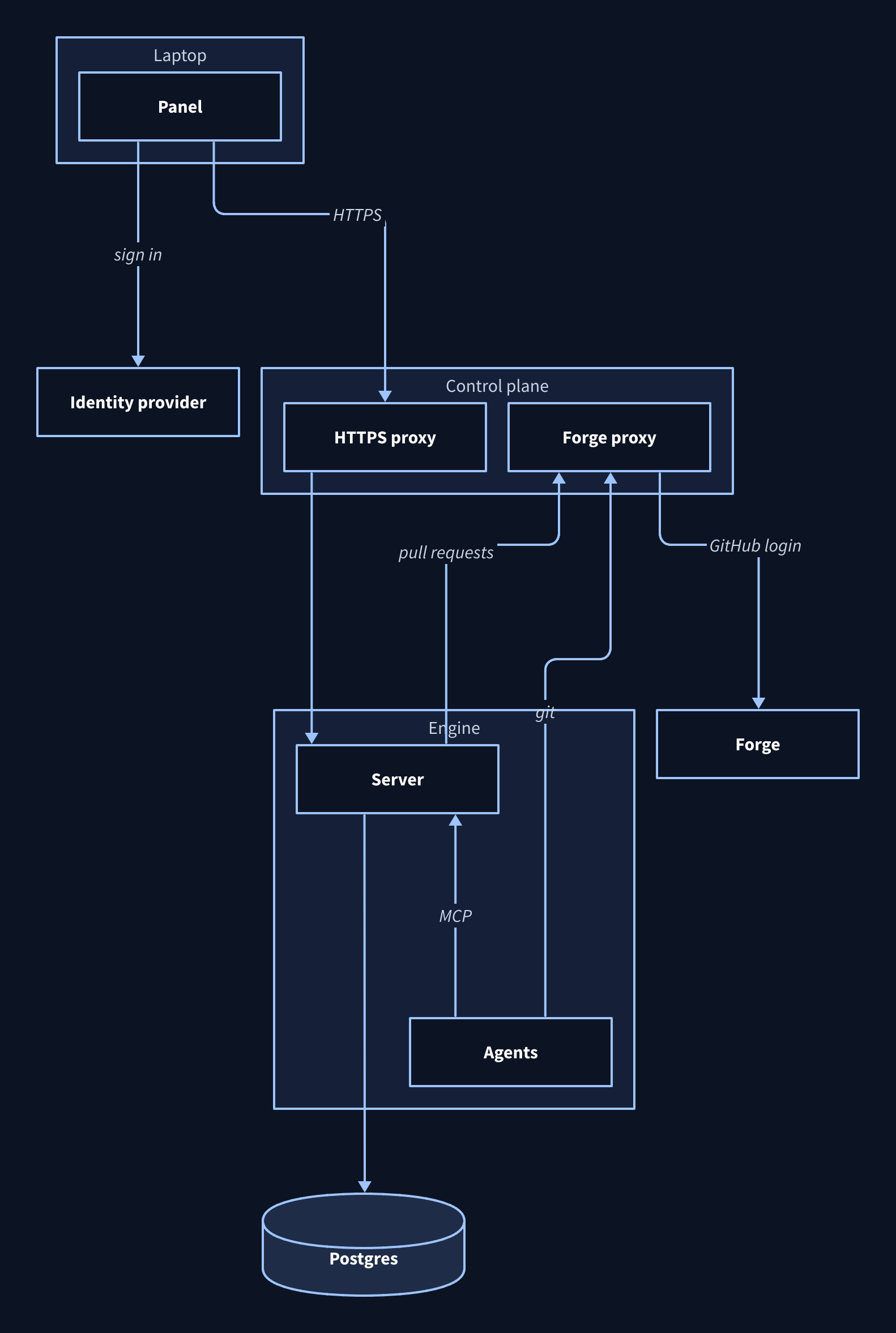
Each person’s engine runs on a machine of its own. Every engine keeps its records in one shared Postgres, and row-level security limits each one to its own, as it does for several engines on a laptop.
The control plane is the one address people reach. It sends each request to the engine the request names, holds people’s GitHub logins, and starts and stops engines.
You open your engine with --engine, as you do on a laptop. A stopped engine is offline until you start it from the panel.
Access#
Every request to a remote engine has to say who sent it. Komrad doesn’t keep passwords.
People sign in through an OpenID Connect provider, Google or Okta for example. The control plane passes each request to the engine’s server, which checks the token from that sign-in against the engine’s access grants. Each engine has one grant, for the person it belongs to. Komrad’s engine covers these grants in more detail.
Each engine’s server accepts people’s requests only from the control plane. The control plane runs the proxy that terminates HTTPS. Komrad’s engine uses Caddy, which gets and renews its own certificate. Any proxy that speaks HTTP/2 works.
The control plane can also sit on a private network instead of the internet. Komrad’s control plane sits on Tailscale, and Tailscale issues Caddy’s certificate. Other private networks, Headscale included, need your own domain with a DNS challenge or a certificate authority every laptop trusts.
Forge credentials#
On a laptop, git and gh use your own token. On a remote engine they still act as you, but the token stays on the control plane. Git and gh hold a placeholder, and the forge proxy on the control plane swaps in your GitHub login before the request leaves. Komrad’s engine covers the details.
The forge proxy serves GitHub. A workflow on GitLab runs on a local engine.
Checklist#
Before you stand up remote engines, have each of these ready or know where it will come from:
- A Linux host for the control plane that stays on.
- A machine for each person’s engine, with a volume that outlives it.
- A Postgres database the engines can reach.
- A name and certificate for the control plane, from a domain or a private network, and a proxy to terminate HTTPS.
- An OpenID Connect provider with komrad registered on it.
- A GitHub OAuth app people authorize.
- A way for operators to get a shell without opening a port to the internet.
Standing up an engine builds all of this on AWS the way komrad’s own engine does.